

Top 5 Best Google Home Security Cameras in 2025
In 2025, smart security cameras have evolved from optional gadgets into essential tools for safeguarding homes. With rising concerns over privacy, package theft, and remote monitoring, these devices empower homeowners to keep an eye on what matters—anytime, from anywhere. Whether you’re checking in on kids, deterring intruders, or monitoring deliveries, a smart camera adds a vital layer of visibility and peace of mind.
What sets today’s best options apart is their deep integration with Google Home. With voice commands, live video streaming on smart displays, and seamless automation with other connected devices, Google Home–compatible cameras bring effortless control and a more unified smart home experience.
This guide highlights five standout security cameras that excel in versatility, intelligent features, and long-term value. From AI-powered alerts to flexible installation and storage options, each one delivers something unique, so you can find the perfect fit for your needs.
What to Look for in a Google Home-Compatible Security Camera
Choosing the right security camera for your Google Home setup means balancing smart features, video clarity, and installation flexibility. Here’s what to prioritize:
Google Assistant Integration and Voice Control
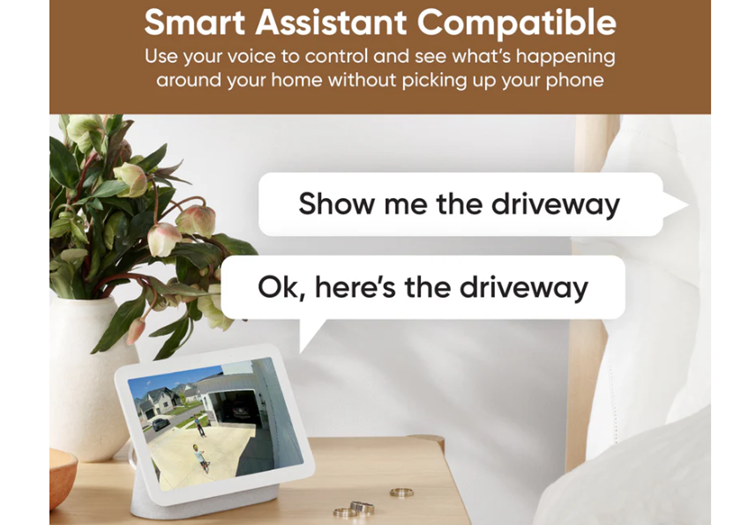
A camera that works with Google Assistant lets you stream live footage to Nest Hub displays or Chromecast-enabled TVs using simple voice commands like “Hey Google, show me the backyard.” Native integration also enables routine automation, such as turning on lights when motion is detected.
Video Quality and Night Vision
Look for cameras with at least 1080p HD resolution, though 2K or 4K models offer sharper detail—especially useful for identifying faces or license plates. Color night vision or infrared LEDs ensure clear footage even in low-light conditions, which is crucial for 24/7 monitoring.
Motion Detection and Smart Alerts
Advanced models use AI-powered detection to distinguish between people, pets, vehicles, and packages. This reduces false alarms and ensures you’re only notified when it matters. Some cameras also support activity zones and familiar face recognition for even smarter alerts.
Cloud vs. Local Storage
- Cloud storage (like Nest Aware) offers remote access and longer video history but usually requires a subscription.
- Local storage (like EufyCam’s HomeBase or microSD cards) provides privacy and no monthly fees, though footage may be lost if the device is stolen.
Indoor vs. Outdoor Use
Make sure the camera is rated for your intended environment:
- Indoor cams are compact and ideal for monitoring pets or entryways.
- Outdoor models should be weather-resistant (IP65 or higher) and may include features like spotlights or floodlights for added deterrence.
Top 5 Google Home Security Cameras (2025 Edition)
1. Google Nest Cam (Battery)
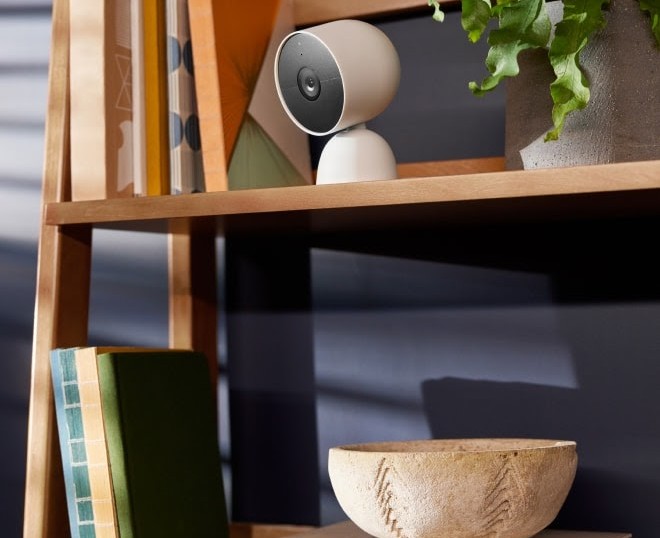
Wire-Free & Weather-Resistant
The Nest Cam is designed for maximum placement flexibility. Thanks to its rechargeable battery and IP54 weather resistance, you can mount it indoors or outdoors without worrying about wiring or harsh weather. It attaches magnetically to its base, making installation a breeze, even on metal surfaces. A weatherproof power cable is also available separately for more permanent setups.
Smart Alerts Without a Subscription
One of its standout features is on-device machine learning, which allows it to identify people, animals, and packages immediately—no Nest Aware subscription required. This means you’ll get relevant notifications without being bombarded by every leaf that blows by.
Facial Recognition with Nest Aware
If you opt for a Nest Aware subscription, the camera can go a step further by recognizing familiar faces. It learns who’s who over time and sends personalized alerts like “Mom is at the door,” which is especially helpful for families or frequent visitors.
Battery Life That Adapts to Your Usage
Battery performance ranges from 1.5 to 7 months, depending on how active the camera’s location is. High-traffic areas will drain the battery faster, while quieter spots can stretch the charge for months. You can also plug it in for continuous power if needed.
Seamless Google Home Integration
As a Google product, it integrates natively with the Google Home app—no third-party workarounds needed. You can:
- View live feeds on Nest Hub or Chromecast-enabled TVs
- Use voice commands like “Hey Google, show me the backyard.”
- Create automations and routines (e.g., turn on lights when motion is detected)
2. Wyze Cam v3
The Wyze Cam v3 is a fan favorite for a reason—it delivers impressive features at a fraction of the cost of premium brands, making it a go-to for budget-conscious smart home users.
Budget-Friendly Powerhouse with Color Night Vision
Despite its low price, the v3 offers 1080p HD video with a Starlight CMOS sensor, which enables color night vision even in extremely low light. This means you can see rich, full-color footage at night—something usually reserved for higher-end models.
Indoor/Outdoor Flexibility
With an IP65 weather resistance rating, the Wyze Cam v3 is built to handle rain, dust, and snow. It’s perfect for both indoor and outdoor use, and with the optional outdoor power adapter, you can keep it running continuously outside without worry.
Smart Features That Punch Above Their Price
- Motion and sound detection with real-time alerts
- Customizable motion zones to reduce false alarms
- Built-in siren to deter intruders
- Smoke and CO alarm sound detection for added safety
These features make it a surprisingly robust security tool for its price point.
Flexible Storage Options
You can choose between:
- Cloud storage via the optional Cam Plus subscription, which unlocks person, pet, vehicle, and package detection
- Local storage using a microSD card (up to 256GB) for 24/7 continuous recording—no subscription needed
Google Assistant Support
Wyze Cam v3 integrates with Google Assistant, allowing you to stream live video to Nest Hub displays or Chromecast-enabled TVs. Just say, “Hey Google, show me the front porch,” and you’re instantly connected.
3. Ring Pan-Tilt Indoor Cam
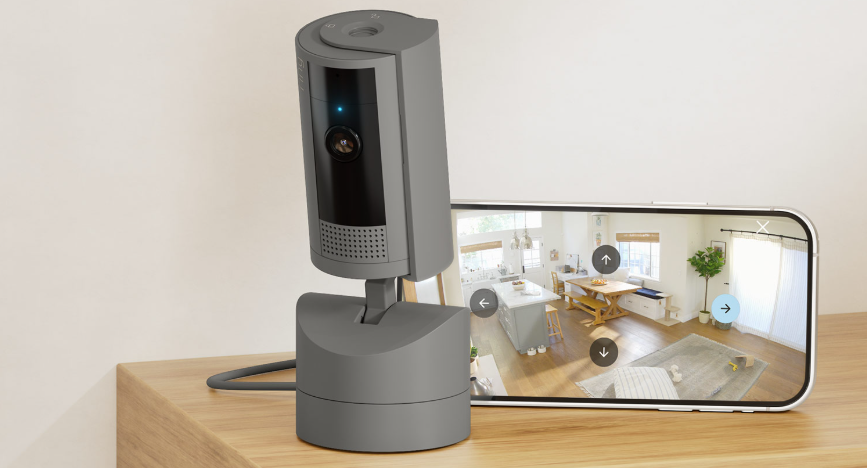
The Ring Pan-Tilt Indoor Cam is a dynamic indoor security solution designed for users who want complete room coverage and flexible control—all in a compact, plug-in device.
360° Pan + 169° Tilt for Full-Room Visibility
Mounted on a motorized base, this camera offers 360° horizontal panning and 169° vertical tilting, allowing you to remotely scan an entire room from the Ring app. Whether you want to check on pets, kids, or unexpected movement, you can manually adjust the view or set it to follow motion.
HD Video & Color Night Vision
It records in 1080p Full HD, delivering crisp, smooth footage day or night. The color night vision feature ensures you can see details even in low-light conditions, and the two-way talk lets you communicate clearly with anyone in the room. A privacy shutter adds peace of mind when you want to disable the camera.
Motion Tracking & Pre-Roll Recording
The camera can track movement across its field of view, keeping subjects in frame as they move. The Pre-Roll feature captures a few seconds of footage before motion is detected, giving you more context for every event, especially useful for reviewing unexpected activity.
Google Home Integration (via Alexa Bridge)
While Ring is part of the Amazon ecosystem, it can still work with Google Home through Alexa routines or third-party integrations. This means you can include it in broader smart home automations, though it lacks the native Google Assistant support found in Nest or Arlo devices.
Ideal For
- Pet owners who want to follow their furry friends around the room
- Large indoor spaces like living rooms, playrooms, or offices
- Users who want manual control and full-room visibility from a single device
4. Arlo Pro 4
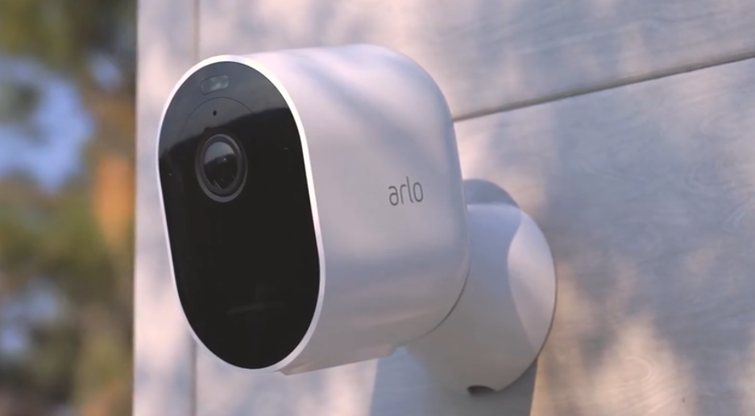
The Arlo Pro 4 is a top-tier outdoor security camera that blends high-resolution video with smart detection and seamless Google Home integration, making it a favorite for homeowners who want both clarity and control.
2K HDR Video with 12x Zoom & 160° Field of View
Unlike standard 1080p cameras, the Arlo Pro 4 captures footage in 2K resolution with HDR, delivering crisp detail even in challenging lighting. The 12x digital zoom and wide 160° field of view ensure you can monitor large areas and zoom in on faces or license plates without losing clarity.
Integrated Spotlight & Color Night Vision
The built-in spotlight activates when motion is detected, helping deter intruders while enhancing visibility. Combined with color night vision, you’ll get full-color footage even in low-light conditions—ideal for identifying people or vehicles at night.
Smart Alerts with AI Detection
With an Arlo Secure subscription, the camera can distinguish between people, vehicles, animals, and packages, reducing false alerts and keeping you informed only when it matters. You can also set activity zones to focus on specific areas, like your driveway or porch.
Google Assistant Compatibility
The Arlo Pro 4 integrates natively with Google Assistant, allowing you to stream live video to Nest Hub displays or Chromecast-enabled TVs using voice commands. It also supports two-way audio, so you can speak to visitors or delivery drivers directly from your phone.
Flexible Mounting & Long Battery Life
Thanks to its magnetic mount, the camera is easy to install and reposition. It’s weather-resistant for year-round outdoor use and offers up to 6 months of battery life on a single charge. You can also opt for a magnetic charging cable for continuous power.
5. EufyCam S330 (SoloCam S340)
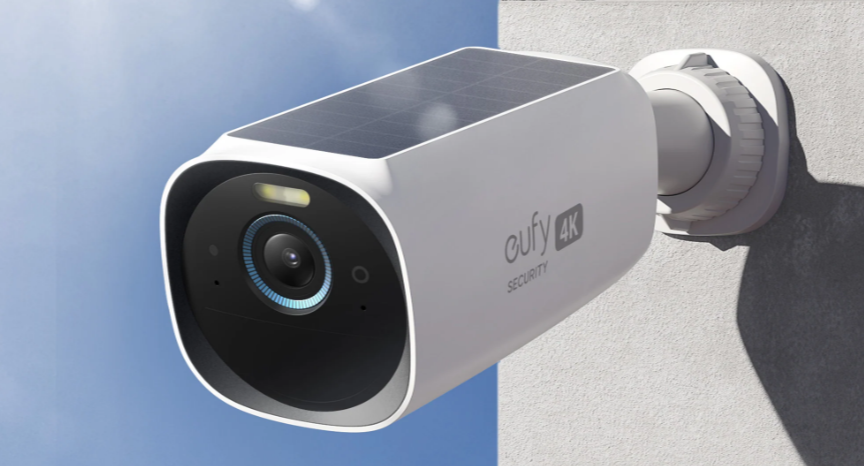
The EufyCam S330, also known as the SoloCam S340, is a feature-packed outdoor security camera that delivers premium performance without monthly fees, making it a standout for privacy-conscious users who want full control and clarity.
Dual-Lens 3K + 2K Zoom
This camera features two lenses:
- A 3K wide-angle lens for capturing the full scene with a 135° field of view
- A 2K telephoto lens with 8x hybrid zoom for close-up detail up to 50 feet away
Together, they provide dual-view streaming, so you can monitor the big picture and zoom in on critical areas simultaneously.
360° Pan & 70° Tilt with AI Tracking
The motorized base allows for 360° horizontal rotation and 70° vertical tilt, giving you full coverage of your surroundings.
- AI-assisted tracking automatically follows people or vehicles across the frame
- You can also set a default viewing position, so the camera resets after tracking
This ensures no blind spots, even in large or complex outdoor spaces.
Solar Charging for Continuous Power
The S340 includes a removable solar panel that keeps the battery topped up with just 2 hours of sunlight per day.
- No need for frequent recharging
- Ideal for remote or hard-to-wire locations
- USB-C port available for backup charging if needed
Local AI Detection – No Subscription Needed
Unlike many competitors, the S340 offers on-device AI that can:
- Detect people and vehicles
- Send smart alerts without relying on cloud processing
- Store footage locally on 8GB of built-in memory, with no hidden fees
This means your data stays private, and you avoid ongoing costs.
Google Assistant Support
The camera integrates natively with Google Assistant, allowing you to:
- View live feeds on Nest Hub or Chromecast-enabled TVs
- Use voice commands like “Hey Google, show me the driveway.”
- Include it in smart home routines for added automation
Comparison Table – Google Home-Compatible Security Cameras (2025)
| Camera | Resolution | Power Source | Google Home Support | Best For |
|---|---|---|---|---|
| Nest Cam (Battery) | 1080p HDR | Battery | ✅ Native | All-around smart security |
| Wyze Cam v3 | 1080p | Wired | ✅ Via Google Home | Budget-conscious users |
| Ring Pan-Tilt Cam | 1080p | Wired | ✅ (via Alexa routines) | Indoor 360° coverage |
| Arlo Pro 4 | 2K HDR | Battery | ✅ Native | Outdoor smart alerts |
| EufyCam S330 | 4K | Battery/Solar | ✅ Native | Privacy & local storage |
This table offers a comparison to help decide what’s best for their needs—whether it’s resolution, power options, or ecosystem compatibility.
Buying Guide – How to Choose the Right Camera
Choosing the right Google Home-compatible security camera means balancing your home’s layout, your privacy preferences, and the features that matter most to you. Here’s how to make a smart, confident decision:
Consider Your Home Layout and Coverage Needs
Start by mapping out your home’s entry points, blind spots, and high-traffic areas.
- Small apartments may only need one or two cameras for doors and windows.
- Larger homes or properties with yards may require multiple cameras to cover front/back doors, garages, and side alleys.
- Use wide-angle or pan-tilt cameras for open spaces, and zoom-capable models for driveways or gates.
Pro tip: Overlapping camera views can help eliminate blind spots and provide backup footage in case of tampering.
Prioritize Resolution and Night Vision for Clarity
- 1080p HD is the baseline for clear video, but 2K or 4K resolution offers sharper detail—especially useful for identifying faces or license plates.
- Look for color night vision or infrared LEDs to ensure visibility in low-light conditions.
- Cameras with HDR handle tricky lighting (like shadows or glare) better, preserving detail in bright and dark areas.
Decide Between Cloud vs. Local Storage
- Cloud storage (e.g., Nest Aware, Arlo Secure) offers remote access and longer video history, but usually requires a monthly fee.
- Local storage (e.g., EufyCam with HomeBase or Wyze with microSD) provides privacy and no ongoing costs, but footage may be lost if the device is stolen.
- Some cameras offer hybrid options, letting you choose or combine both.
Look for Smart Detection and Minimal False Alerts
- Choose cameras with AI-powered detection that can distinguish between people, pets, vehicles, and packages.
- Activity zones let you focus alerts on specific areas (like your porch) and ignore others (like a busy street).
- Facial recognition (available on Nest and Ecobee) adds another layer of intelligence, reducing unnecessary pings.
FAQ
Q: Can I use these cameras without a subscription?
Yes, most of these cameras offer basic functionality without a subscription, such as live streaming and motion alerts. For example:
- Nest Cam (Battery) provides live view and 3 hours of event history for free.
- Wyze Cam v3 supports local microSD storage, so you can record without paying monthly fees.
- EufyCam S330 offers local AI detection and storage, meaning no subscription is required at all.
However, features like cloud video history, facial recognition, and smart alerts often require a paid plan (e.g., Nest Aware or Arlo Secure).
Q: Do all of them support two-way audio?
Yes, all five cameras in this list support two-way audio, allowing you to speak and listen through the camera using your phone or smart display. This is especially useful for:
- Talking to delivery drivers
- Scaring off intruders
- Checking in on pets or family members
Q: How do I connect them to Google Home?
To connect a compatible camera:
- Open the Google Home app
- Tap the “+” icon → Set up device → Works with Google
- Select your camera brand and follow the prompts to link your account
Once connected, you can say things like:
“Hey Google, show me the front door camera”
to stream live footage on a Nest Hub or Chromecast-enabled TV.
Q: Which camera is best for outdoor use?
For outdoor use, consider these top picks:
- Arlo Pro 4: 2K HDR video, spotlight, weather-resistant, and smart alerts—great for driveways or backyards
- Nest Cam (Battery): IP54-rated, wire-free, and integrates natively with Google Home
- EufyCam S330: 4K resolution, solar charging, and local storage—ideal for privacy-focused users
Each offers weather resistance, night vision, and motion detection, but your choice depends on whether you prioritize video quality, power source, or subscription-free operation.
🏁 Final Thoughts
Choosing the right Google Home-compatible security camera in 2025 isn’t just about specs—it’s about finding a device that fits your lifestyle, home layout, and privacy preferences.
In this roundup, we explored five top contenders:
- Nest Cam (Battery) for a seamless, all-around Google integration and smart alerts
- Wyze Cam v3 for unbeatable value and color night vision
- Ring Pan-Tilt Indoor Cam for dynamic 360° indoor coverage
- Arlo Pro 4 for crisp 2K video and advanced outdoor monitoring
- EufyCam S330 for ultra-high resolution and subscription-free local storage
Each model brings something different to the table, from facial recognition and solar charging to local AI detection and motion tracking.
As you make your decision, weigh your priorities:
- Want a wire-free setup with intelligent alerts? Go with Nest or Arlo.
- Looking for full coverage indoors? Try Ring’s Pan-Tilt Cam.
- Need premium resolution with no monthly fees? Eufy’s got your back.
- Tight budget but still want smart features? Wyze is hard to beat.
Ultimately, the best security camera is the one that aligns with your home, your budget, and your comfort level with cloud or local storage. With the right pick, you’ll gain more than just surveillance—you’ll add peace of mind and smarter security to your daily life.